
One free app to sell online and run your business.
133 tools for your online store, payments, sales, wholesale pricing, bookings, listings, orders, locations, customers, newsletters and team, plus an AI assistant that does the busy work. Free forever.

Showing all 133 features
Online store 15
A professional store under your own brand, ready to share anywhere.
Free custom store
Your own storefront at gob.ng/store/yourname. Your brand, your products, your rules.
Unlimited products
List as many products as your business has. No catalogue limits, ever.
Product variations
Add options like size and colour to any product, each with its own price and stock count.
Product add-ons and extras
Priced extras on any product, like toppings, extra protein or sides, so customers pay for exactly what they want.
Store and product categories
Organise your catalogue into categories and subcategories so customers browse easily.
Custom domain
Connect your own domain, like yourstore.com, to your GOB store for free. We handle the DNS.
Free SEO tools
Set custom titles and meta descriptions for your store and every product so customers find you on Google.
Instant search on your store
Shoppers start typing and matching products appear as they go, so a big catalogue is never in the way.
Lightweight, fast storefront
Every store loads fast on any connection, which is better for customers and for Google ranking.
Free in-app discovery
Your store is listed for browsing inside the GOB app, giving you free exposure to shoppers.
Coupon codes and promotions
Create discount codes and run promotions to drive more orders and reward loyal customers.
Invoice generation
Create and send professional invoices to customers directly from your store.
Store themes
Pick from professionally designed themes for your storefront and switch any time.
One account, every store
Run as many stores as your business needs from one GOB account and switch between them in one tap.
Checkout links
Selling in WhatsApp or Instagram DMs? Generate a payment link for any order, no full store visit needed.
Sales and announcements 11
Drop your prices or say something to everyone who opens your shop.
Store-wide sales with no code
“20% off everything until Sunday”, with nothing for a shopper to be given or to type. A sale is a price change, so the lower figure shows on every product page, product card, cart, checkout link and invoice.
A percentage or an amount off
Take 20% off, or ₦500 off, whichever reads better for what you sell.
Choose what goes on sale
The whole shop, with any categories or products carved out, or only the categories or products you pick.
Start and end dates
Set it to go up on Friday and come down on Sunday night. Nobody has to be awake for it.
The best sale wins
Run several at once — 20% off dresses, 10% off shoes — and each product takes the best one for it. Two never stack, so you can always picture the result.
Announcement bar
A thin strip above your header with one line and an optional link, for the thing every shopper should see first.
Announcement popup
A card over the page with its own picture, heading and button. Show it straight away, after a delay you set, or when a shopper moves to leave, and cap how often one person sees it again.
Scrolling announcement
A line that moves across the page, for the kind of message that is only read because it moves. It stays still for anyone whose phone asks for less motion.
Each one on its own switch and dates
One bar, one popup and one scrolling line per store, each turned on and off on its own and each with its own date range.
Never an empty banner
An announcement with nothing typed in it is never shown, however it is set up, so a switch flicked on early cannot put a blank strip across your shop.
Sales and announcements are Premium
If a subscription lapses they stop showing and everything you set up is kept, ready for when you come back.
Wholesale and bulk pricing 7
Sell by the dozen: the price drops as the quantity goes up.
Wholesale products
A kind of product sold in bulk. It still ships, still counts stock and still takes sizes, colours and add-ons like any physical product, and your storefront says it is sold wholesale.
Bulk prices per quantity
One to ten at ₦20,000 each, eleven and up at ₦17,000. Set where each price starts and what it drops to, and the cart, checkout and order all quote the same figure.
Flat or step-by-step pricing
Charge the whole order at the price the quantity reaches, or price each band separately and blend the result, with the arithmetic shown on the receipt.
Trade prices for one customer group
Open the bulk price to everyone, or only to a customer group like Wholesale or VIP, so retail shoppers never see your trade price.
You decide what a sale does to it
Say whether a bulk price stacks with a sale price or one of them wins, so a promotion can never quietly take your margin.
Bulk prices on variations too
A size or colour with its own price can carry its own bulk prices, because that is the thing being bought by the dozen.
Bulk prices are Premium
If a subscription lapses the prices stop applying but your table is never deleted. It is still there, waiting, when you come back.
Multi-location stores 12
One shop to your customers, however many branches you run behind it.
One shop, several branches
Customers see one store with one link, one domain, one catalogue and one set of reviews, whether you run one shop or five.
Add a location in the app
Name where it is, like “Ikeja”, and it is open. There is no second store to create and nothing to merge.
Stock counted per branch
The same shirt in three shops is one product with three stock counts, not three products that share a name.
Each branch keeps its own day
Orders, customers, staff, pickup address, shipping settings, expenses, invoices, bookings and the activity log all belong to the branch, so one shop’s numbers are never mixed into another’s.
Staff belong to a branch
Invite someone to the branch they actually work in, or to several, and their permissions follow them there.
Switch branch on any screen
Every screen that is per-branch has a switcher, so you read today’s orders for Ikeja and then Abuja without going anywhere.
Analytics together or apart
See the whole business as one set of numbers, or one branch at a time.
Shoppers buy from one branch
The storefront sells what the branch they chose actually has in stock, and the cart stays with that branch all the way through checkout.
Pay on delivery per location
Offer pay on delivery at the branches where it makes sense and leave it off at the others.
A main location
One branch is the main one, and that is where the shop’s link, domain, theme and catalogue live.
A way back out
A location can be taken back out of the group and run as its own store again, so nothing you do here is one-way.
Premium, plus the locations you pay for
Locations need Premium and each extra location is paid for alongside it. A branch beyond what you have paid for simply runs as a free store rather than switching off.
Bookings and appointments 16
Sell your time: customers pick a date and a slot, and your calendar stays yours.
Take bookings on any product
Turn a product into a bookable service: a haircut, a photoshoot, a repair job, a consultation or a class. Customers pick a date and time on your store.
Your real working hours
Set the hours you work on each weekday, with more than one range a day, so “9 to 1 and 3 to 6” is two rows and lunch is never bookable.
Days off and blocked dates
Block a public holiday, a trip or a Saturday you need back, with a note on why.
Price per job, per hour or per person
A flat price for the job, an hourly rate with the customer choosing hours, a price per person for a class, or a “from” price when the real figure needs a quote.
Deposit, full payment or pay in person
Take the whole amount at checkout, take a deposit (a percentage or a set amount) and collect the rest on the day, or take the booking with no payment at all.
No double bookings
Picking a slot holds it while the customer is still paying, so two people can never buy the same 2pm.
More than one booking per slot
Set how many bookings one slot can take: three chairs in a salon, twelve seats in a class.
Travel and clean-up time
Add a buffer after each booking so nobody is booked into the time you need to pack up and get to them.
Notice period and booking window
Set the shortest notice you will take and how far ahead your calendar is open at all.
Confirm instantly or approve each request
Let customers book straight in, or hold every booking as a request until you accept it.
Ask your own questions
Add the questions you need answered at the time of booking: plate number, house address, hair length, whatever the job needs.
At your place, theirs or online
Say where it happens and add the address, the meeting link or a “we come to you” note, shown once the booking is confirmed.
Your day, in the app
A Bookings screen with every appointment in order: confirm, decline, mark it complete or a no-show, and see what you still collect on the day.
Confirmations and reminders sent for you
Customers get a confirmation the moment they book and a reminder the day before. You get a notification on your phone for every new booking.
Cancellations with a notice window
Customers can cancel themselves up to the notice you set. After that it goes through you.
One free to try
Every store can set up one bookable service at no cost — the same free slot a listing uses, so it is one or the other. Premium takes bookings on as many products as you like.
Listings 12
For businesses that sell one of a thing: cars, property, land and equipment.
Car, property, land and equipment listings
List a thing rather than stock, with the details that decide the sale and a page built to show them.
The right fields for the thing
A car asks for make, model, year, mileage, transmission and condition. A flat asks for bedrooms, toilets, furnishing and service charge. Land asks for size and title document.
Prices with their period
Rent per year or per month, a shortlet per night, hire per hour, or a flat total. A price without its period is a wrong price.
Marked negotiable
Say when the figure is open to an offer, so buyers get in touch instead of scrolling past.
Where it is
State, city and area on every listing, so a buyer knows whether it is worth the trip before they call.
Enquiry, inspection or buy
Choose what the main button does: send you an enquiry, book an inspection on your calendar, or buy it outright through checkout.
Enquiries in one place
An Enquiries screen with every message, the name and number behind it, marked new, contacted or closed.
Its own section, and in your catalogue
Listings get a browsable page of their own, and they also sit alongside your products, opening the listing page instead of a product page.
Listing pages in your store’s theme
The listing uses your store’s colours, fonts and header, so it reads as part of your store rather than a bolt-on.
An enquiry page, not a delivery form
A listing asks who you are and how to reach you, instead of asking a car buyer for a shipping address.
Your own extra details
Add as many of your own “label: value” lines as the thing needs, for whatever the fields didn’t anticipate.
One free to try
Every store can post one listing at no cost — the same free slot a bookable service uses, so it is one or the other. Premium lifts the limit.
Payments and wallet 10
Get paid every way customers like to pay, and move money whenever you need to.
Accept every payment type
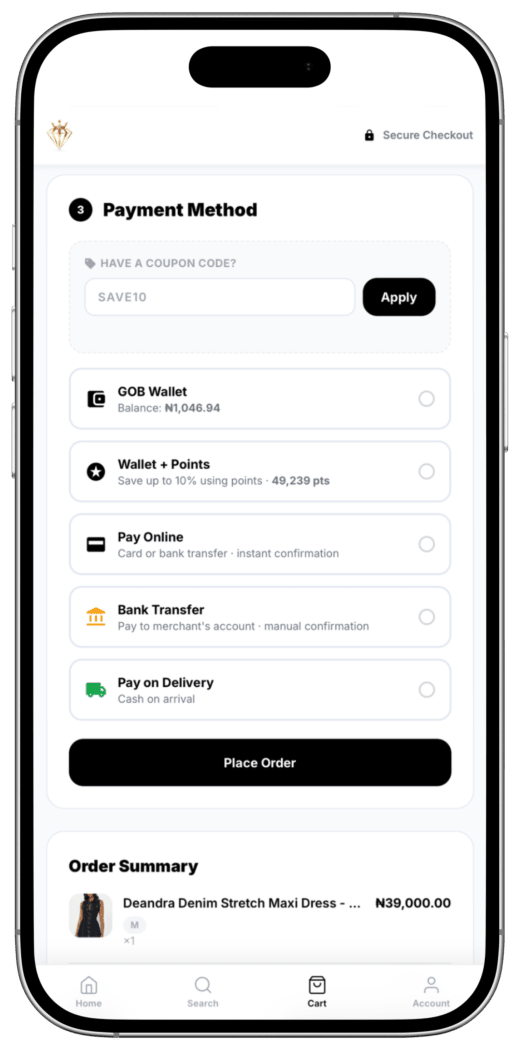
Card, bank transfer, USSD and GOB Wallet. Customers pay whichever way they prefer.
International payments
Receive USD, EUR, GBP, CAD and GHS from customers abroad, settled straight into your GOB wallet.
Instant settlement
Wallet payments land in your GOB wallet the second a customer pays. No waiting period.
Pay on delivery
Offer pay on delivery on the orders you choose. You stay in control.
Take transfers into your own account
With Premium, show your own bank or mobile-money details at checkout. The money goes straight to you, GOB takes nothing on the order, and you confirm each one in the app once it arrives.
24/7 withdrawals
Withdraw to any Nigerian bank account any time, day or night, from as little as ₦100.
Dedicated virtual account
Your own account number for bank deposits straight into your GOB wallet.
Corporate account number
Registered businesses can get a corporate account number alongside their personal one, keeping business money separate.
Send money and bank transfers
Move funds from your wallet to any bank account in seconds.
Business bill payments
Pay for airtime, data, cable TV, betting wallets and electricity straight from your business wallet.
Orders and fulfilment 5
Every order tracked from the moment it comes in to the moment it’s delivered.
Real-time order dashboard
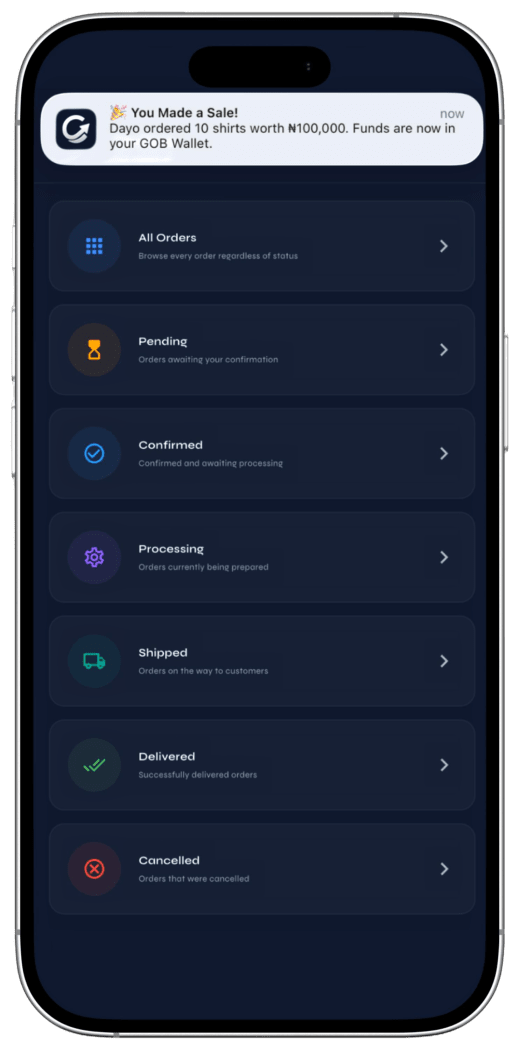
See every order the moment it comes in and manage them all from your phone.
Instant order alerts
Get notified the second a customer places an order on your store.
Customer order tracking
Your buyers can follow their order from purchase to delivery.
Optional Shipbubble integration
Connect your own Shipbubble account and your store quotes live courier rates at checkout. Pickup and delivery run on your Shipbubble settings, and status updates flow back to your store.
Offline sale recording
Sold on WhatsApp, Instagram, TikTok or in person? Log it in seconds and keep every sale in one place.
Abandoned cart recovery 13
The shoppers who almost bought are the easiest sales you will ever make.
Every abandoned cart logged
When a shopper fills in their details at checkout and leaves without ordering, GOB records it: who they are, what was in the basket and what it came to.
See the cart, not just the name
Open an abandoned cart and see every item, variation, add-on and quantity they picked, with the total.
In your customer list
Abandoned shoppers sit in your customer list under their own tab, with their name, email and phone number, so they are people you can act on.
Follow-up emails sent for you
A reminder goes out an hour after they drop off, and a second one a day later if they still haven’t ordered. The second one is yours to switch off.
A discount code that wins the sale back
Attach one of your coupons to the reminder and the code goes out inside the email, with the discount spelled out.
Your own message in the reminder
Add a line of your own: free delivery today, or that there are two left.
Sent as your store
The email goes out in your store’s name with your logo and colours, shows the items they left, and the link brings the basket back exactly as it was, on any device.
Chase a cart on WhatsApp
Most of these shoppers leave a phone number, not an inbox they read. GOB writes the message — the basket, your live coupon code and a link that restores the cart — and opens it in your own WhatsApp for you to send.
No WhatsApp account to connect
Nothing to verify with Meta, no provider account and no per-message bill. GOB writes the message and you tap send in the chat you already sell in.
Send them a newsletter too
Put abandoned shoppers into a customer group and send that group a newsletter, the same as any other group.
Opt-outs respected
Every reminder carries a one-click unsubscribe on your own domain, and anyone who has opted out of your store’s email is never chased.
Nothing kept longer than it’s useful
Abandoned carts are deleted after 90 days.
Collected free, sent with Premium
Every store collects abandoned carts from day one, so the list is already waiting when you upgrade. Reading it and sending the reminders are Premium.
Customers and email marketing 10
Every buyer in one list, grouped how you like, with newsletters sent from your own domain.
One customer list
Everyone who bought online, was recorded as an offline sale or subscribed on your storefront, merged into a single list with no duplicates. Free for every store.
Customer groups
Put customers into groups like VIP, wholesale or repeat buyers, and move people in and out whenever you like.
Export customers to CSV
Download your whole customer list, with the groups each person belongs to, as a spreadsheet. Your customer data is yours.
Newsletter signup on your storefront
A signup box in your store footer collects subscribers while you sleep, so your list grows on its own.
Email newsletters
Write a newsletter in the app and send it to your subscribers, your whole customer list, or one group. Sending is Premium and runs on your own email provider account.
Email one group, not everyone
Pick a single customer group as the audience, so a wholesale-only or VIP-only announcement reaches only the people it’s meant for.
Newsletter templates
Start from the free Simple layout, or design with drag-and-drop block templates for a newsletter that looks like your brand.
Send from your own domain
Verify your custom domain and newsletters go out from an address on it, like [email protected], instead of a generic one. Replies land on your store’s contact email.
Test before you send
Send yourself a test copy and preview the newsletter exactly as customers will see it, before a single real email goes out.
Unsubscribes handled for you
Every newsletter carries a one-click unsubscribe link on your own domain, and anyone who opts out is never emailed by your store again.
Team and operations 8
Run the business side with your team: people, numbers and books.
Staff management
Add team members to your store and work together, with no shared logins.
Roles and permissions
Decide exactly what each staff member can see and do on your store.
Staff activity tracking
See what your team does on the store. Full accountability, zero guesswork.
Sales analytics
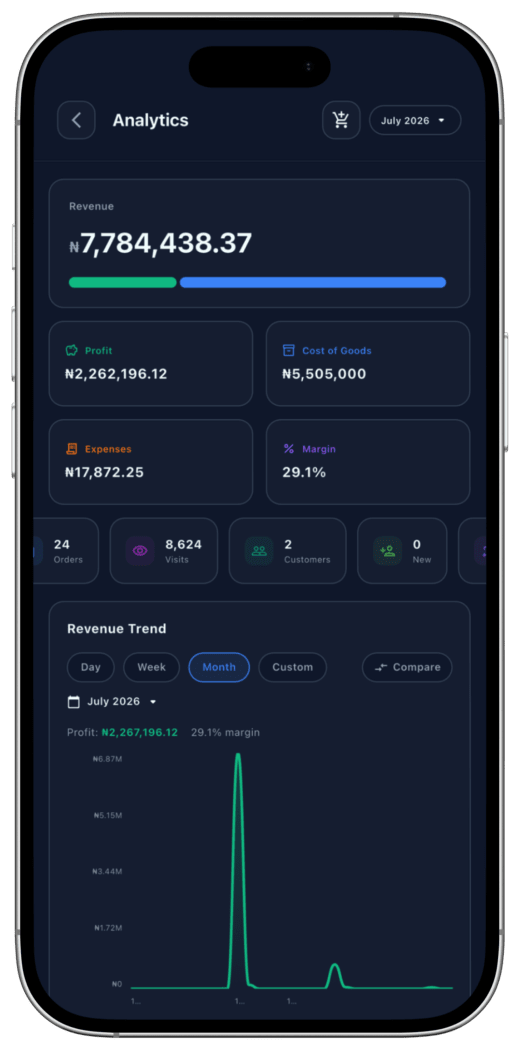
See your best-selling products, total revenue and how customers find you.
Profit and loss reports
See what your business is really making: revenue, expenses and net profit for any period.
Expense tracking and bookkeeping
Log every business expense by category and keep clean books, no spreadsheet required.
Home screen widget
Add a GOB widget to your phone’s home screen and see today’s revenue, orders and visits at a glance.
Run it from your phone
No hosting and no laptop required. Manage your whole business from the GOB app.
GOBie AI assistant 8
An assistant built into your store that handles the busy work when you ask.
Chat-based store manager
Tell GOBie what you want in plain English and it gets it done, no menus to dig through.
AI product listing
Describe your product in plain English and GOBie fills in the title, description, price and variations.
Set up a booking by chat
Say what the service is, how long it takes and when you work, and GOBie fills in the hours, the price mode and the questions to ask at booking.
Write a listing from a few details
Give GOBie the make, year, mileage and price and it writes the listing and fills in the fields for a car, a flat or a plot of land.
AI business analyst
Ask GOBie about your sales, profit or expenses and get instant answers.
Pay bills in one sentence
Type “buy ₦2,000 airtime for 0803…” or “renew my DSTV” and GOBie handles the rest.
Smart transfers
No more typing long account numbers. Describe who you’re paying and GOBie finds them.
Built-in guardrails
GOBie confirms before anything risky happens. Smart, but never reckless with your money.
Marketing and growth 3
Get found, build trust and keep customers coming back.
One link, share anywhere
Post your store link on WhatsApp Status, your Instagram bio, Facebook or X, wherever your customers are.
Customer reviews
Buyers can leave reviews on your store, building trust for the next customer who visits.
Not a marketplace
Every product stays under your brand. GOB never resells or owns what you list.
Security and trust 3
Protection for you and your buyers on every order.
Identity verification (KYC)
NIN or BVN verification protects you and your buyers before wallet payments unlock.
Instant payment confirmation
Every payment is confirmed immediately, so you never ship before you’re paid.
24/7 store uptime
Your store stays live and accepting orders around the clock.
No features match .
If you need it, tell us. We read every request.
Request a feature
What should GOB build next?
Tell us what your business needs and our team will review it. We read every request.
Open your store today.
It takes about five minutes, and it costs nothing. Download GOB, add your products and share your link.